A Dank Material Shell plugin for controlling the user's Tailscale connection.
 vybe
843e3d01f0
vybe
843e3d01f0
- Removed import Quickshell.Io + all 4 Process { toggleProcess, copyProcess, exitNodeProcess, statusCheck }
- All one-shot commands now use Proc.runCommand(id, argv, (stdout, exitCode) => {...})
- _pendingAction moved to clean root property (was hacked onto statusCheck object)
- Introduced _runStatusCheck() helper + updated wrappers (toggleTailscale, refreshStatus, setExitNode, copyToClipboard, _runNextCopy)
- Exact same sequencing and defensive logic:
  * toggle: set pending → status poll for truth → decide up/down → act → post-act status verify
  * copy retry state machine unchanged (just Proc instead of .command/.running)
  * exit-node and generic refresh paths identical
- Added explicit comment documenting why the poll-act-poll exists (defensive, not forbidden state per AGENTS.md)
- stderr detail dropped from action errors (per chosen A strategy; generic messages only)
- All new JS follows repo ; + {} style
- I18n wrappers already in place from prior slice

Written by AI agent working for @jtmorris. Model: grok-build-0.1.
|
||
|---|---|---|
| docs/agents | ||
| resources | ||
| tailscalectl | ||
| test | ||
| .gitignore | ||
| AGENTS.md | ||
| LICENSE | ||
| README.md | ||
Tailscale Widget Plugin for Dank Material Shell
A lightweight widget plugin that shows Tailscale connectivity status on the Dank Bar with quick controls for toggling connection, switching exit nodes, and copying peer addresses.
Features
- Status icon in the bar —
vpn_keywhen connected,vpn_key_offwhen disconnected - Right-click to toggle Tailscale on/off
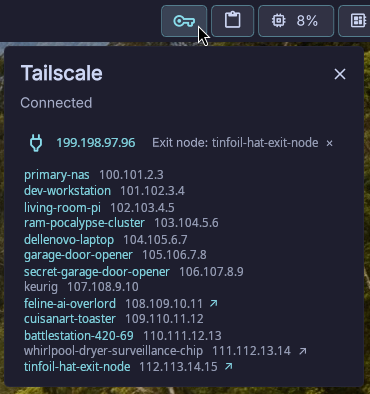
- Left-click to open a popout showing:
- Your current Tailscale IP
- Active exit node (with clear button)
- Peer list with hostnames and IPs
- Click-to-copy any hostname or IP to clipboard
- Exit node selection — click
↗on any exit-node-capable peer to route through it - Auto-refresh — status polls every 5 seconds
- Toast notifications for all errors
Requirements
- Dank Material Shell installed and running
tailscaleCLI available onPATH- A clipboard tool (
dmsorwl-copy)
Installation
-
Clone or copy this repository so that the
tailscalectl/directory is available:git clone <repo-url> -
Place the
tailscalectl/directory into your DMS plugins directory:mv tailscalectl ~/.config/dankmaterialshell/plugins/The directory must contain:
tailscalectl/ ├── plugin.json ├── TailscaleWidget.qml └── lib.js -
Reload the plugin:
dms ipc call plugins reload tailscalectl -
The Tailscale icon should appear on your Dank Bar. If connected, it shows a filled key icon; if disconnected, an outlined key icon.
Usage
| Action | How |
|---|---|
| Toggle connection | Right-click the bar icon |
| Open popout | Left-click the bar icon |
| Copy hostname/IP | Click the text in the peer list |
| Set exit node | Click ↗ next to an exit-node peer |
| Clear exit node | Click × next to "Exit node: ..." or click ↗ on current node |
Plugin Manifest
{
  "id": "tailscalectl",
  "name": "Tailscale",
  "description": "Tailscale status and controls on the Dank Bar",
  "version": "0.1.0",
  "author": "John Morris & Vybe (AI Slop... er... Coding Assistant)",
  "icon": "vpn_key",
  "type": "widget",
  "component": "./TailscaleWidget.qml",
  "permissions": ["settings_read", "settings_write", "process"]
}
Testing
node --test test/lib.test.js
License
See LICENSE.